

Working from home sounds dreamy—until you’re hunched over your laptop at the kitchen table with back pain and three half-empty coffee mugs staring at you. I learned quickly that a productive home office isn’t about having more stuff. It’s about having the right things.
Therefore, I’ve refined my setup into something that feels cozy and beautiful—but also incredibly efficient. Everything in this list is something I personally use and genuinely recommend if you want a home office that supports focus, posture, and creativity.
Here are my favorite home office essentials.
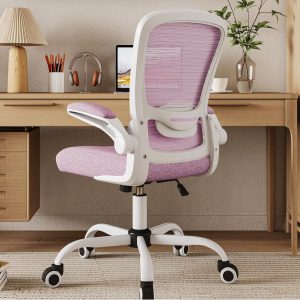
My Comfy Home Office Chair (Non-Negotiable)
This was the upgrade that changed everything. I use a gaming chair, and yes—it’s a cute cat theme. Furthermore, if you sit for hours writing, working, or running your business, your spine deserves better than a dining chair.

Why I love it:
- Proper lumbar support (no slouching)
- Breathable soft fabric
- Fully adjustable everything
- Cute cushions and accessories included
However, if you want something less cutesy but still aesthetic, an ergonomic office chair is a great alternative that still feels supportive and clean-looking.
My Adjustable Standing Desk
I use a standing desk because I refuse to feel like a Victorian ghost by 3PM. It’s one of my favorite pieces in my office.

Why I love it:
- Memory presets (one tap and I’m standing)
- Smooth motor—no jerky lifting
- Clean, minimalist look
Specifically, standing for even an hour or two during the day keeps my energy up and helps me stay mentally sharp.
Bonus: it makes the whole space feel modern and intentional.
Laptop Stand for Better Posture
Before this, I didn’t realize how much I was craning my neck, hunched over a little screen. A simple laptop stand brought my screen to eye level instantly. My desk looks cleaner, and my posture is dramatically better.
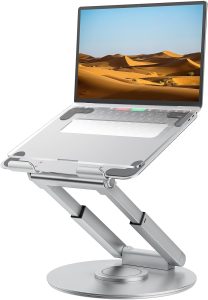
I chose a neutral-toned aluminum stand that blends into my space. It feels minimal and polished—not clunky.
External Keyboard & Mouse
Also, if you work off a laptop, please do not type flat on your desk all day. Hence, I use an external keyboard and mouse so my arms sit naturally and my wrists don’t ache by evening.

I have the Razer Huntsman V3 Pro for my keyboard. I love mechanical keyboards, and the clicky sound of this, paired with the feedback I get from the keys, is ideal.
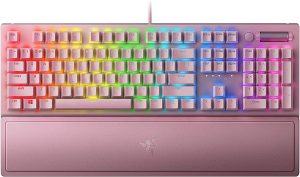
However, if I were to purchase a new keyboard, I would go with the Razer BlackWidow V3 because, duh, aesthetics~~~

As far as the mouse goes, I’ve matched my current setup with a Razer Basilisk V3. It’s smooth and speedy, and I can make adjustments to the sensor or scroll speed at the touch of a button.

If I were to choose a mouse to go with the more aesthetic pink keyboard, I’d likely choose the Logitch Lift for its ergonomic design and wireless function.
Soft, Adjustable Desk Lighting for Home Office
Lighting completely changes how a workspace feels. I use a dimmable LED desk lamp that lets me switch between warm and cool tones depending on the time of day.
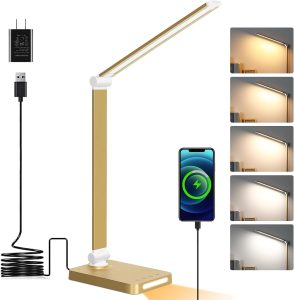
Warm light in the morning = cozy creative energy.
Cool light in the afternoon = focused productivity mode.
It keeps my eyes from straining and makes the space glow softly at night.
Noise-Canceling Headphones (For Deep Work)
When I need to focus, I disappear into my headphones. I use the Sony WH-CH700N, and they’re pretty good at blocking out noises. They’re lightweight and comfortable.

Above is the most comparable version available today, the Sony WH-CH720N. I would probably repurchase this if my current pair gave out. Below is something on my wishlist because it does cost double-to-triple times the above model.

I plan to eventually upgrade to the Sony WH-1000XM5 when I can afford the premium price!
Cable Management (Because Chaos is Distracting)
Nothing destroys a beautiful workspace faster than tangled cords. I use:


These items keep everything clean and visually calm. When my desk looks peaceful, my brain feels peaceful.
A Real Planner (Yes, Paper)
I use a physical planner alongside digital tools. Writing things down keeps me focused and grounded. It also prevents digital overwhelm.
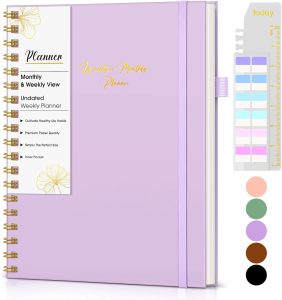
I also enjoy being able to go back and look at notes from previous days. I find it helpful to see my progress at a glance.
Home Office Whiteboard (The Brain Outside My Brain)
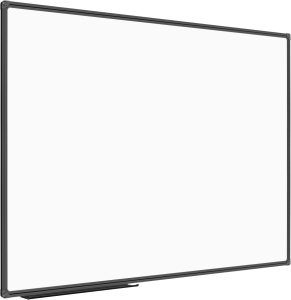
I didn’t realize how much mental clutter I was carrying until I put it on a wall.
I use a large, minimal whiteboard mounted right beside my desk—big enough to see from across the room. Mine is a 48 x 36 Inch Magnetic Whiteboard, and it’s simple, clean, and blends perfectly into a neutral office.
Here’s how I use it:
- Weekly priorities (top 3 only—no chaos lists)
- Content ideas as they come to me
- Project timelines
- Revenue goals that I can’t ignore
Something about physically standing up and writing things down activates a different level of clarity. It gets ideas out of my head and into structure.
I prefer a frameless or thin-frame design so it feels intentional, not classroom-y. Add aesthetic neutral markers and a soft eraser, and it suddenly looks curated rather than corporate.
Why it works:
- Reduces digital overwhelm
- Keeps long-term goals visible
- Encourages strategic thinking
- Makes planning feel tactile and satisfying
If your brain runs fast (and you do a lot of creative or strategic work), a whiteboard becomes your external hard drive.
It’s functional. It’s visual. And it quietly keeps everything moving forward.
How I Designed My Home Office for Efficiency and Aesthetics
Here’s the balance I follow:
- If it’s functional, it must be supportive.
- Visible items must be beautiful.
- If I use it daily, it must be high quality.
A productive home office doesn’t have to feel corporate. Mine feels soft, intentional, and calm—but it works hard.
That’s the sweet spot.
Final Thoughts: Build a Workspace That Supports Your Goals
Your home office isn’t just decor. It’s where you:
- Build your career
- Write your ideas
- Plan your future
- Create income
Invest in pieces that protect your energy and make you want to sit down and start.
Efficiency can be beautiful.
Productivity can feel cozy.
And your workspace should reflect that.
Let’s build beautifully, work intentionally, and make productivity feel like home. ✨
Leave a Reply